How to Stay Updated on AI as a Software Developer — Without the Noise
Published July 3, 2026
Another Tuesday, another AI SDK — the third one this week just landed in your team's Slack. Meanwhile, the API you actually call in production quietly deprecated an endpoint, and you nearly missed it.
Good news — you're in the right place! Setting this up takes about two minutes, and the first edition is free.
In this guide, I'll show you how to stay updated on AI as a software developer using MorningMail, a tool I built. Every morning, an AI agent searches the web and writes you a short email: real releases with version numbers, papers with benchmarks, primary sources — no hype threads.
So, let's dive in — it's really easy!
What you'll build
Generic AI newsletters write for everyone at once — marketers, researchers, your CTO. None of them care that you build on a specific runtime with specific SDKs, and that one minor-version bump matters more to you than any keynote.
MorningMail flips that. You write one instruction — like a ticket for a sharp colleague — and every morning an agent searches the web from scratch and writes the email itself. It's not a link forwarder like Google Alerts: it reads, filters, and reports back with sources you can verify in one click.
And your prompt carries your context permanently. Adopt a new framework tonight? Add its name, and tomorrow's edition covers it. Your reading list becomes one sentence you maintain — not thirty subscriptions.
See it live: today's edition
So here's a real example. This is today's edition of exactly this newsletter — written by the agent this morning, based on the example prompt from this guide. Not a mockup: I run it myself on MorningMail.
Edition from October 7, 2026
Mistral Large 4 ships; llama.cpp and Burn optimize; vLLM.cpp running strong
Mistral Large 4 public preview
Mistral just shipped its largest model yet: 1 trillion parameters, natively multimodal.
Mistral Large 4 (ML4) enters public preview now via the Mistral Studio API with open weights arriving October 27 under a custom license [Quelle: Mistral]. The 49-billion active-parameter model trained on 4,000 Nvidia Grace Blackwell GPUs in European datacenters, scoring 62% on DeepSWE v1.1 (software engineering), 67% on FinWorkBench (enterprise finance), and 73% on remote-sensing vision tasks—beating GPT-6 Astra on grounding benchmarks [Quelle: The Next Web]. Mistral is targeting enterprises and governments seeking sovereign infrastructure control.
Open-weight coding models just got meaningfully faster.
llama.cpp & Burn compiler speed wins
Two inference engines just shipped measurable speedups for production workloads.
llama.cpp released CUDA BF16 support for the XIELU kernel, K2 Horizon dense and MoVA model support, and CLAMP operation fixes across CPU and CUDA backends [Quelle: GitHub]. Burn 0.22 eliminated backend type parameters from the user-facing API, slashing compilation times 6–15× faster—6.22× for CNN edits, 14.73× for transformer loops—while cutting peak VRAM use 49% for CNNs and 18% for transformers [Quelle: Tracel]. Burn also added LoRA, QLoRA, ONNX export, and peer-to-peer compute via Iroh.
Framework iteration cycles just compressed significantly.
vLLM.cpp breaks through in C++
A community port just beat the original inference engine at scale.
vLLM.cpp, a 66 MiB C++20 runtime porting continuous batching and block-paged KV cache from vLLM without PyTorch, achieves 1.045× vLLM throughput on Qwen-3.6-27B at low concurrency and matches or exceeds it under load [Quelle: GitHub]. On CPU with GGUF files, it reaches 223.8 tokens/sec prefill—1.18× faster than llama.cpp. Recent updates added Vulkan ternary quantization, ROCm EXL3, CUDA with DFlash2 drafters, and token-for-token parity across 44 architectures.
Serverless platforms are likely to ship vLLM.cpp as default.
 Introducing Mistral Large 416 hours ago ... ... AI assistants, autonomous agents, and multimodal AI with open models ... Despite strong performance on Cyber benchmarks, the average refusal rate of the model ...mistral.ai
 Europe's Mistral launches Large 4 to challenge China's lead in open ...16 hours ago ... Early benchmarks lead in coding and vision ... Popular articles. 1. Mistral releases Large 4, a 1 trillion-parameter open-weight AI model.thenextweb.com
 Releases · ggml-org/llama.cpp - GitHub5 hours ago ... regex_error(error_escape) before a token is produced. Where the fallback does compile it is still wrong. ... Includes the K2 Horizon implementation from ifm-ai/ ...github.com
 Burn 0.22.0: Faster Builds, Easier Extensions, and Smarter Autotuning5 hours ago ... ... compiler and kernel foundations. The new CubeCL Environment lets applications reuse warmed compilation and autotuning caches on compatible targets. This release ...tracel.ai
One click creates your own editable copy — change the prompt, the delivery time, everything.
Browse all editions →You could get this general version into your inbox right now — and then fine-tune it to your very specific needs. Here's how to do it:
Step by step: from zero to your first edition
The whole setup takes about two minutes. And every screenshot below comes straight from the real product — nothing is mocked up.
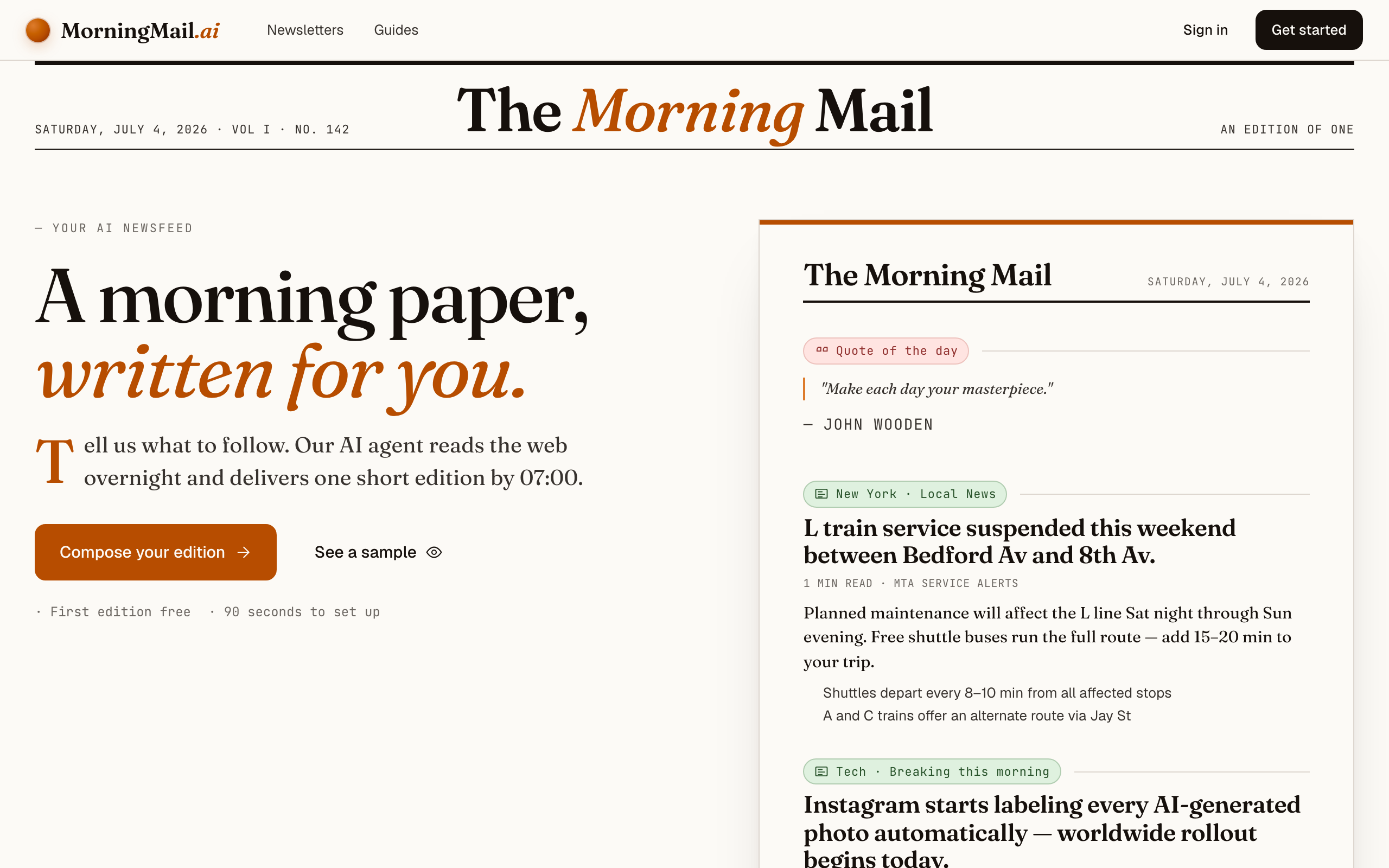
Step 1 Open morningmail.ai
No account yet, nothing to install — the landing page IS where you compose. A friendly press robot introduces itself above one big input, and beside it a sample morning shows you what the email looks like before you have typed a word.
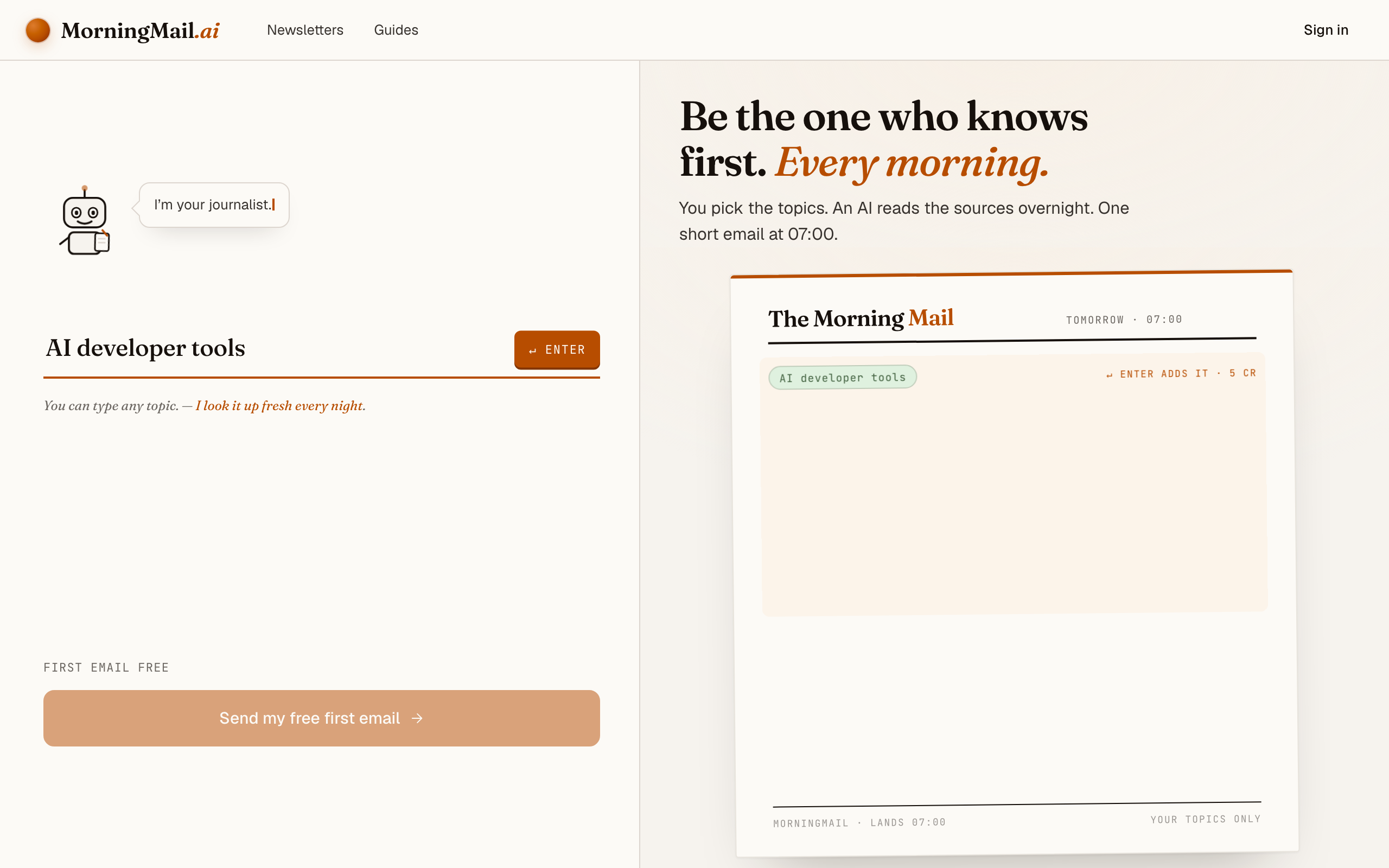
Step 2 Type your topic: AI developer tools
Type AI developer tools into that one input. There is nothing to pick and no form to fill — as you type, a draft section forms on the paper beside you, carrying your topic in a tinted badge and the quiet prompt "↵ Enter adds it", and the ↵ Enter key at the end of the input turns orange.
Step 3 Press Enter (or that orange key) — and read what the agent was told
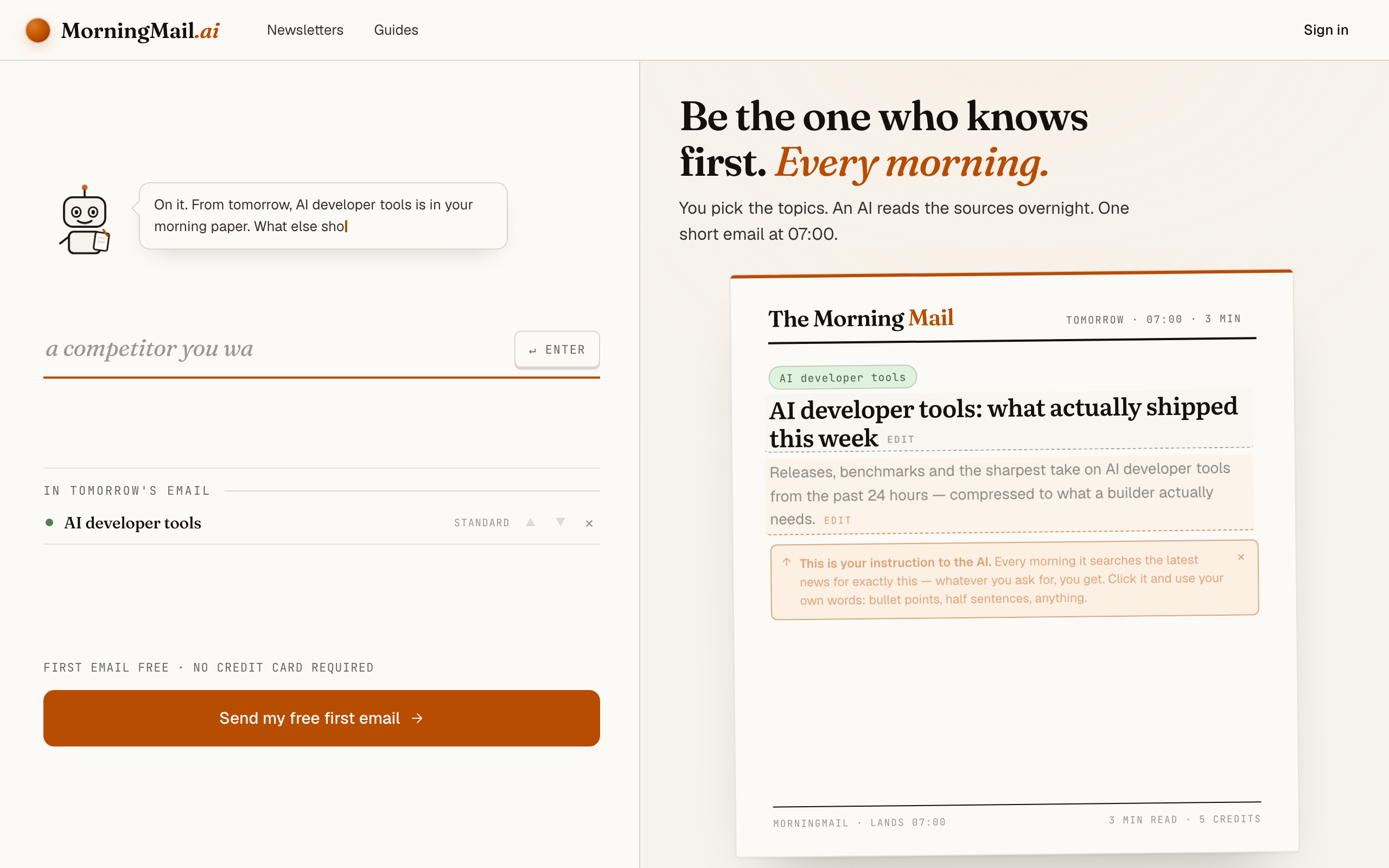
Setup is one input on the landing page — nothing to install, nothing to choose, no account yet. Type AI developer tools and press Enter. The section lands finished on the paper beside you: a beat badge, a suggested headline ("AI developer tools: what actually shipped this week"), and an Assignment written for you — releases, benchmarks and the sharpest take from the past 24 hours, compressed to what a builder actually needs. That's the literal instruction your agent runs tomorrow morning, and you're reading it before you've typed an email address.
It gets sharper with your stack in it. Click the Assignment and append something like: "I ship TypeScript on Node and call the Anthropic and OpenAI APIs in production. Flag SDK breaking changes, deprecation timelines, and anything that moves context windows or per-token pricing." If you'd rather not type, the five tweaks under the field each add a line — "+ skip the hype" is the one I'd reach for here.
The exact prompt your section starts withReleases, benchmarks and the sharpest take on AI developer tools from the past 24 hours — compressed to what a builder actually needs.
Step 4 Send your free first email
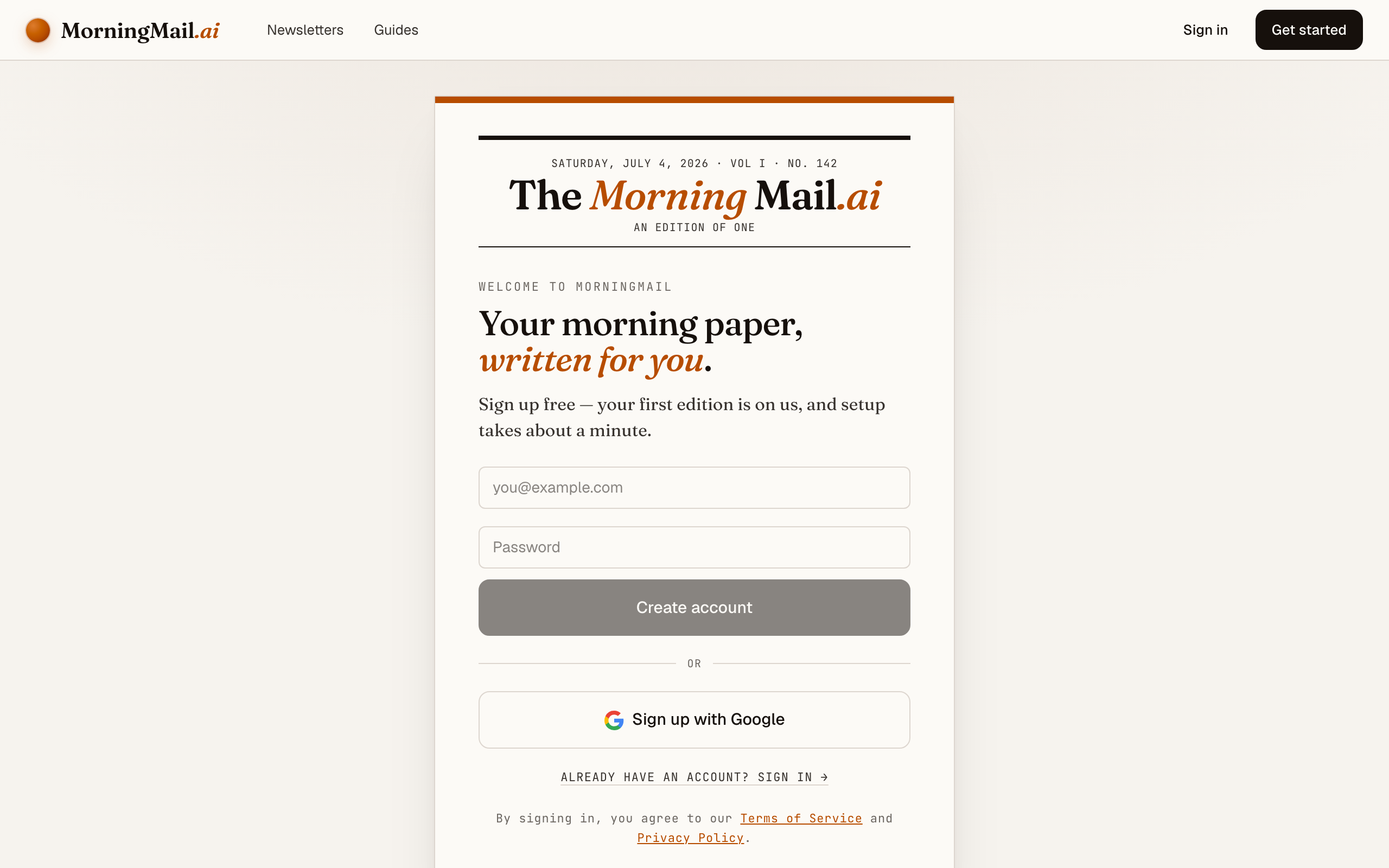
Happy with the paper? Hit “Send my free first email”. The sign-up appears right there — the paper never leaves the screen — and asks the only thing it still needs: where to send it. Email and password, or Google. No card, and the first email is free.
Step 5 Watch it being written
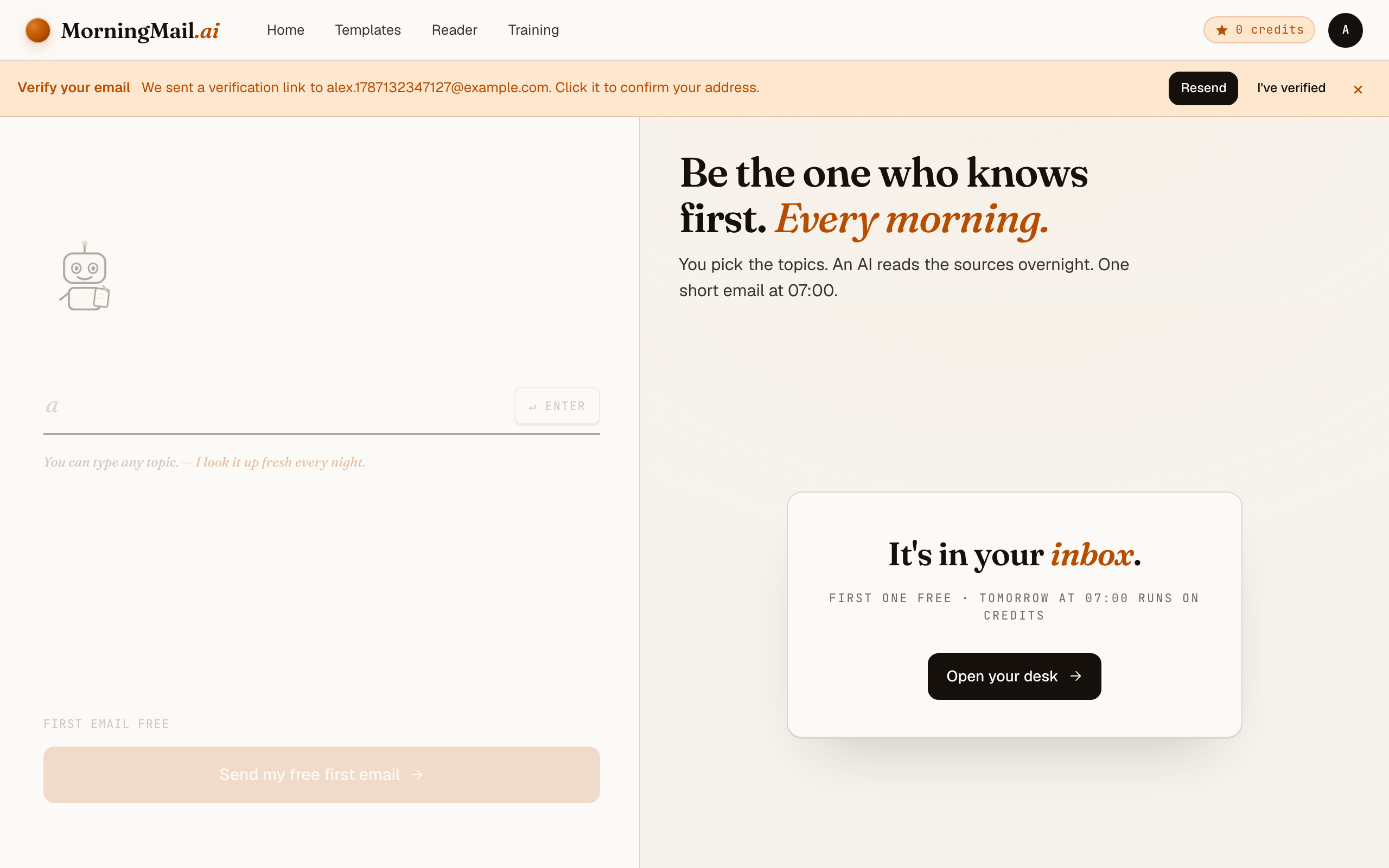
Now the desk goes to work in front of you: working out what to look for, searching the web, reading the best sources, writing your section, composing a subject line, handing it to the post. A minute or two later: "It's in your inbox."
Step 6 Afterwards: the time, the days, the readers
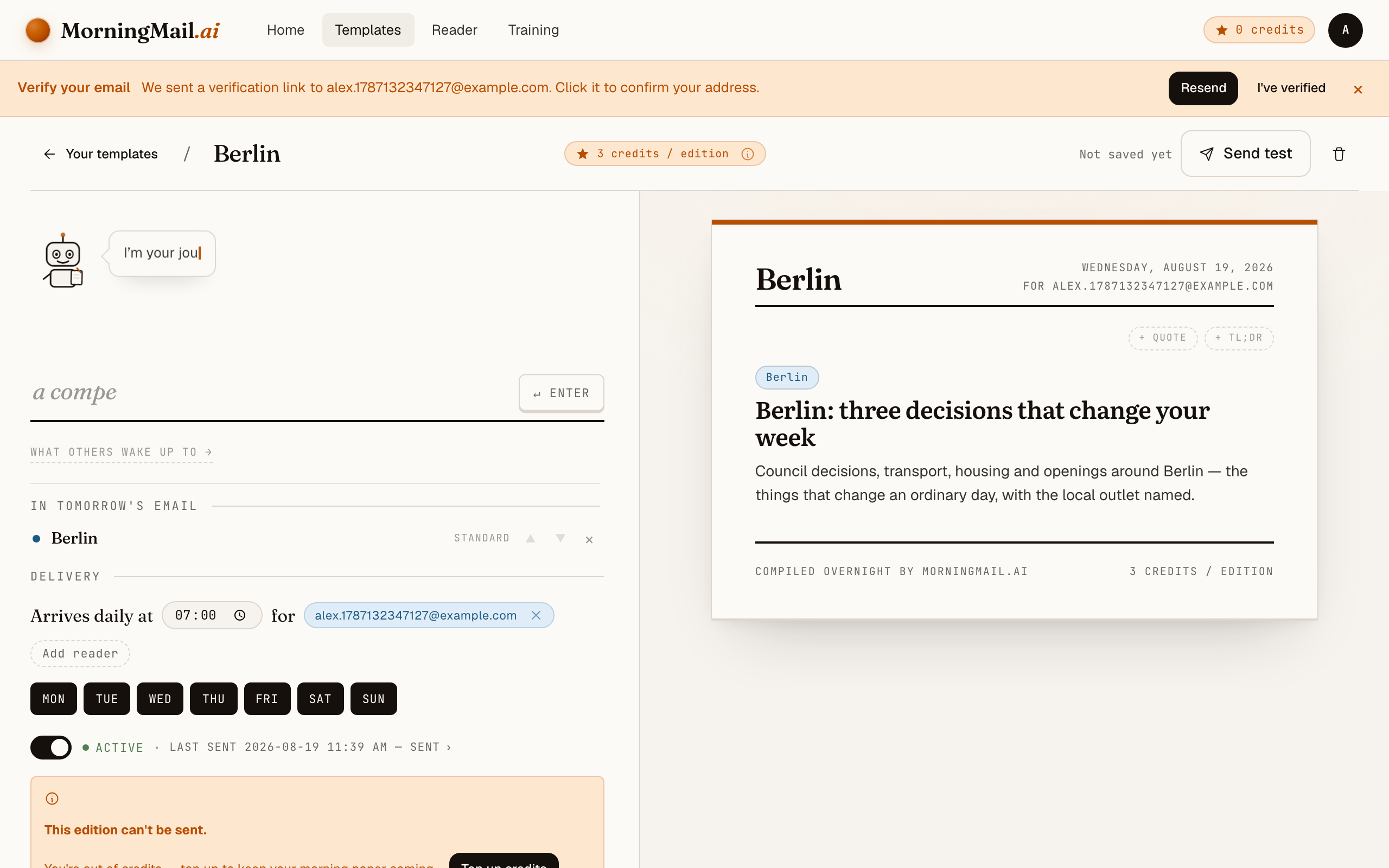
Everything else lives in the builder, once you have a paper to tune. Set the delivery time (07:00 by default) and which weekdays it runs, add readers — up to 100 — and add more topics the same way you added the first: by typing. Nothing here needs deciding on day one.
Get more out of your brief
- Name your dependencies, not your interests
- "AI news for developers" is a mood; "changes affecting LangChain, the Vercel AI SDK, and the Anthropic TypeScript client" is a filter. The agent searches against your words every morning. The more your prompt reads like a package.json, the closer the brief tracks your real exposure.
- Make version numbers a hard requirement
- A story with a version number and a changelog is something you can act on in a pull request. A story without one is marketing. If the brief ever drifts, add "no announcements without a shipped artifact" to the prompt.
- Ask for the migration cost, not just the release
- Append "for each release, one line on what upgrading would touch" to your prompt. That single line turns the brief into standup input: you know whether a bump is a lockfile change or a refactor before anyone opens the changelog.
- Schedule it before your standup, weekdays only
- Nothing during onboarding asks you about timing — you compose first, and the schedule waits for you afterwards. Once your first edition is out, every template has a delivery time and selectable weekdays. I'd pick 7:30, Monday to Friday: the brief lands with your coffee and is still fresh at standup — and your Saturday stays release-note-free 😊
- Add a TLDR section on top for busy sprints
- Stack a TLDR synthesis section above the news section and set it to three bullets. On heavy days you read only those; on quiet days you scroll into the detail. Depth and tone are set per section, so the summary stays terse while the deep dive stays deep.
Good sources to anchor your brief on
The agent searches the open web every morning and cites where it read things. These are the sources I'd point it at in your prompt:
- GitHub release pages of your core dependencies — The ground truth for what actually shipped: version numbers, breaking changes, migration notes. A good brief cites the release tag itself, not a blog post about it.
- Anthropic & OpenAI API changelogs — Where deprecation timelines, model snapshots and pricing changes appear first — the quiet entries that decide whether your integration keeps working.
- Hacker News — Still the fastest filter for what working engineers take seriously. Treat it as a traction signal and follow its links to the source.
- Simon Willison's Weblog — The reference practitioner log for LLM tooling — hands-on evaluations of new models and APIs within hours of release, with reproducible examples.
- arXiv (cs.SE / cs.AI) — Where benchmarked capability claims live before the marketing does. Relevant when a paper's numbers, not a press release, should decide your architecture.
- Latent Space — Engineering-first coverage of the AI tooling ecosystem — good for the why behind releases and which abstractions are actually winning.
Frequently asked questions
- What does a daily brief cost?
- The first edition is free — no credit card. After that, each send costs a few credits per section, priced by the AI model tier that section uses. Unused credits never expire, so pausing for a sprint costs you nothing.
- Why not just use Google Alerts for this?
- Because Alerts mail you links, and the triage is still your job — "AI developer tools" as a keyword drowns you in press releases. MorningMail's agent searches fresh each morning, discards the hype, and writes the email itself, version numbers and primary sources included.
- Can I pin the brief to my exact stack?
- Yes — the prompt is plain, editable text. Name your frameworks, SDKs, even individual repositories, and the agent searches against those exact terms every morning. When your stack changes, you change one sentence.
- How does it avoid recycled hype?
- The Assignment does the filtering, and it starts on the right foot: releases and benchmarks from the past 24 hours, compressed to what a builder actually needs. Make it explicit if you like — "no announcement without a shipped artifact; skip hype threads, leaks and re-summarised summaries" — or tap "+ skip the hype" and that line writes itself. Every claim links its primary source, so you can audit any story in one click.
- Do I have to get it every day?
- No. Rhythm isn't part of the composing step at all — you pick it afterwards, in your template's settings, where each template has a delivery time and selectable weekdays. I'd start with Monday to Friday before standup. A weekly Monday digest works too if daily feels like too much.
Your inbox, your editor
Build your own AI-written brief in two minutes. The first edition is on me — no credit card required.
Build your brief — freeI am always happy to answer questions and I'm open to feedback. Feel free to reach out at any time: marius@morningmail.ai