How to Get Daily AI News as a Product Owner — Without Doomscrolling
Published July 3, 2026
It's 8 a.m., your standup starts in an hour, and someone drops "did you see the new OpenAI pricing?" into Slack. You didn't — you were busy shipping.
Good news — you're in the right place! In about two minutes you'll have a daily AI brief set up, and your first edition is free.
In this guide, I'll show you how to get daily AI news as a Product Owner using MorningMail — a tool I built that writes you a personal morning email. Not a list of links: an actual brief, written fresh every morning from a prompt you control.
So, let's dive in — it's really easy! 😊
What you'll build
Here's the problem with AI newsletters: they're written for everyone, which means they're written for no one. You ship a specific product, on a specific stack, in a specific market — and the digest in your inbox knows none of that.
MorningMail flips this around. You write one short instruction, the way you'd brief a research assistant — and every morning an AI agent searches the web fresh and writes the email itself, implications spelled out, primary sources linked. It doesn't forward links that match keywords, like Google Alerts does. It reads, then writes.
And your prompt carries your context permanently. Tell it once that you build on LLM APIs for EU customers, and every edition is filtered through exactly that. A generic newsletter can never know that a Gemini price cut matters more to you than a robotics demo. Your prompt does.
See it live: today's edition
So here's a real example. This is today's edition of exactly this newsletter — written by the agent this morning, based on the example prompt from this guide. Not a mockup: I run it myself on MorningMail.
Edition from October 7, 2026
EU enforcement live, M&A surges, Trump's audit accord shapes market
EU AI Act enforcement begins
Compliance just stopped being optional in Europe.
The European Commission's AI Office and national authorities began active enforcement on August 2, 2026, with transparency requirements now in effect and high-risk systems (employment, education, biometrics, essential services) due December 2, 2027 [Quelle: JDSupra]. Prohibited practices have applied since February 2025 and general-purpose model obligations since August 2025. Violations carry penalties up to €15 million or 3% of worldwide turnover, converting governance from discretionary into a funded operating requirement.
SaaS teams now race against the December 2027 deadline—the real bite for product-embedded systems.
AI startups become serial acquirers
Venture-backed AI firms just became a consolidation engine.
Through September 29, 195 acquisitions of AI companies by venture-backed AI firms landed in 2026—14% more than all of 2025 [Quelle: Crunchbase]. OpenAI leads with 20 AI acquisitions (10 this year), while repeat buyers like Legora (five acquisitions in 2026 alone) and Harvey (four this year) account for 42% of all transactions over three years. Vertical startups in legal tech, customer service, and software development are moving fastest, using M&A to fill product gaps and enter new markets faster than organic builds.
The speed advantage in scaling AI justifies deal valuations and minimal dilution to existing shareholders.
Trump's AI accord sets voluntary framework
Voluntary commitments just became de facto governance standard.
On September 29, leading AI executives (Anthropic, Google, Meta, OpenAI, Nvidia, xAI) signed the White House Accord on Super Intelligence, establishing a four-layer framework: internal controls, internal verification teams, independent external audits, and board-level oversight [Quelle: ConsumerFinanceMonitor]. Though legally non-binding with no federal enforcement, it mirrors auditing frameworks in financial services and healthcare. The FTC launched a broad investigation into frontier developers the day after signing, signaling the Accord will likely inform future regulation.
Expect auditor qualification standards and independence criteria to harden over the next 18 months.
Agentic governance platforms hit inflection
Governance just became a funded, measurable operating function.
The global agentic AI governance platform market reached USD 7.3 billion in 2025 and will reach USD 203.2 billion by 2035 (39.5% CAGR), driven by EU enforcement and rising organizational adoption from 78% (2024) to 88% (2025) [Quelle: Market.us]. Google's $32 billion acquisition of Wiz, IBM's $11 billion purchase of Confluent, and ServiceNow's $7.75 billion Armis deal underscore investor conviction that governance infrastructure is strategic, not tactical. Documented AI incidents rose 55% (233 to 362) despite rising adoption, proving that speed without controls now carries material risk.
Teams embedding governance into agent behavior are outpacing those treating it as a gate.
 EU AI Act, U.S., UK, China, and Key Compliance Risks for Companies24 hours ago ... Transparency is one of the clearest examples of AI regulation moving directly into product design. ... regulatory compliance, and legal risk management.jdsupra.com
 Crunchbase Data Shows AI's Most Active Startups Are Becoming ...16 hours ago ... The specific companies being acquired offer insight into what AI startups hope to gain from their stepped-up M&A activity. OpenAI's purchases have ranged ...news.crunchbase.com
 Trump's AI Accord: Can Voluntary Self-Regulation and Independent ...6 hours ago ... As stated above, that architecture is hardly unique to AI. Variations of it are already embedded in numerous corporate compliance and risk-management regimes.consumerfinancemonitor.com
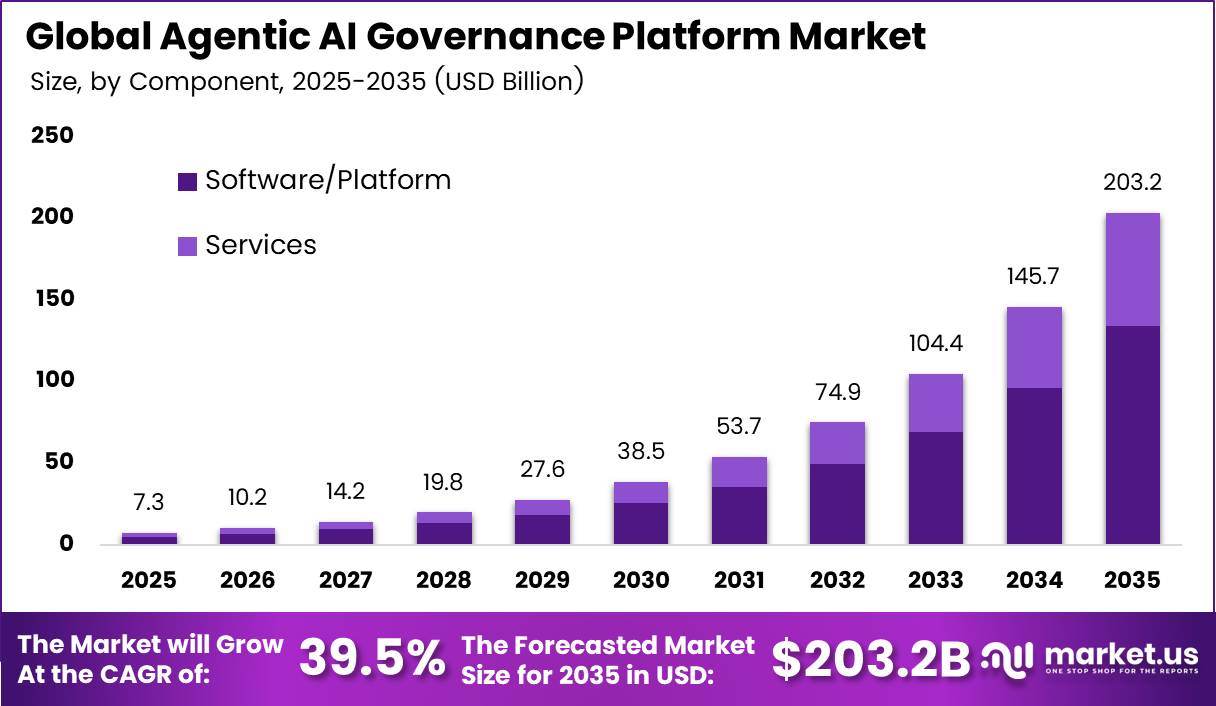 Agentic AI Governance Platform Market Size | CAGR of 39.5%22 hours ago ... Agentic AI Governance Platform Market Size, Share and Report Analysis By Component (Software/Platform, Services), By Deployment (Cloud-based, Hybrid, On ...market.us
One click creates your own editable copy — change the prompt, the delivery time, everything.
Browse all editions →You could get this general version into your inbox right now — and then fine-tune it to your very specific needs. Here's how to do it:
Step by step: from zero to your first edition
The whole setup takes about two minutes. And every screenshot below comes straight from the real product — nothing is mocked up.
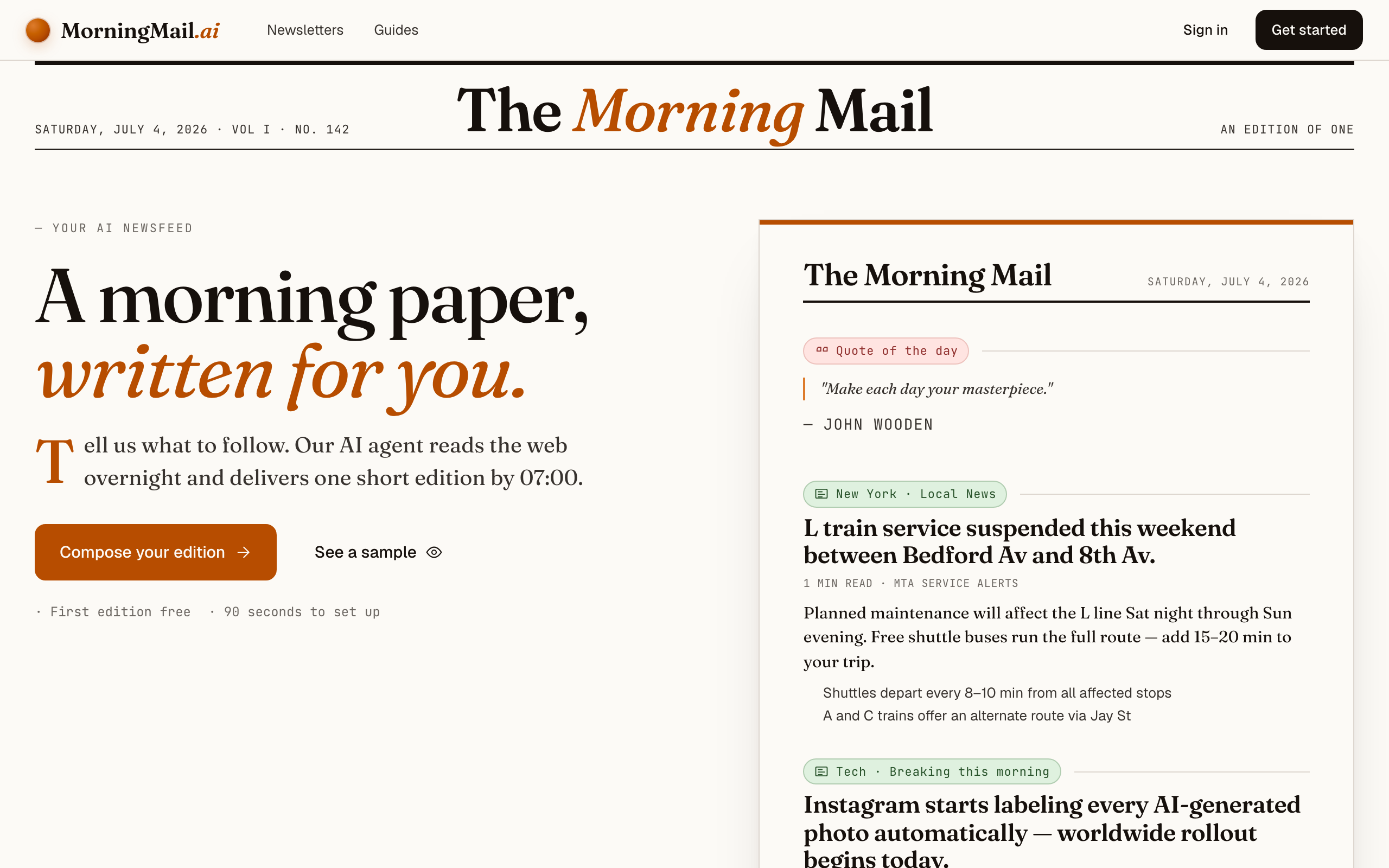
Step 1 Open morningmail.ai
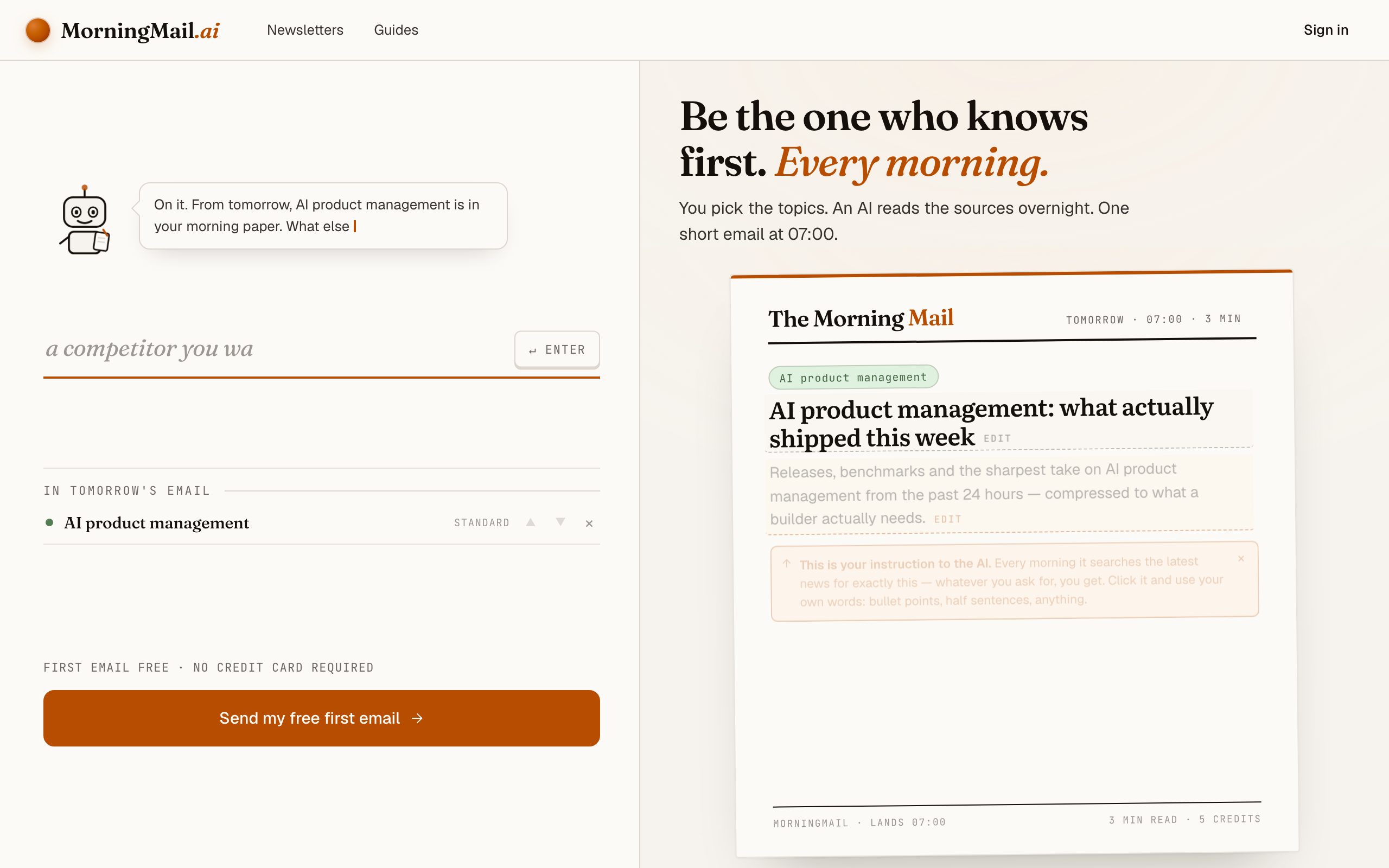
No account yet, nothing to install — the landing page IS where you compose. A friendly press robot introduces itself above one big input, and beside it a sample morning shows you what the email looks like before you have typed a word.
Step 2 Type your topic: AI product management
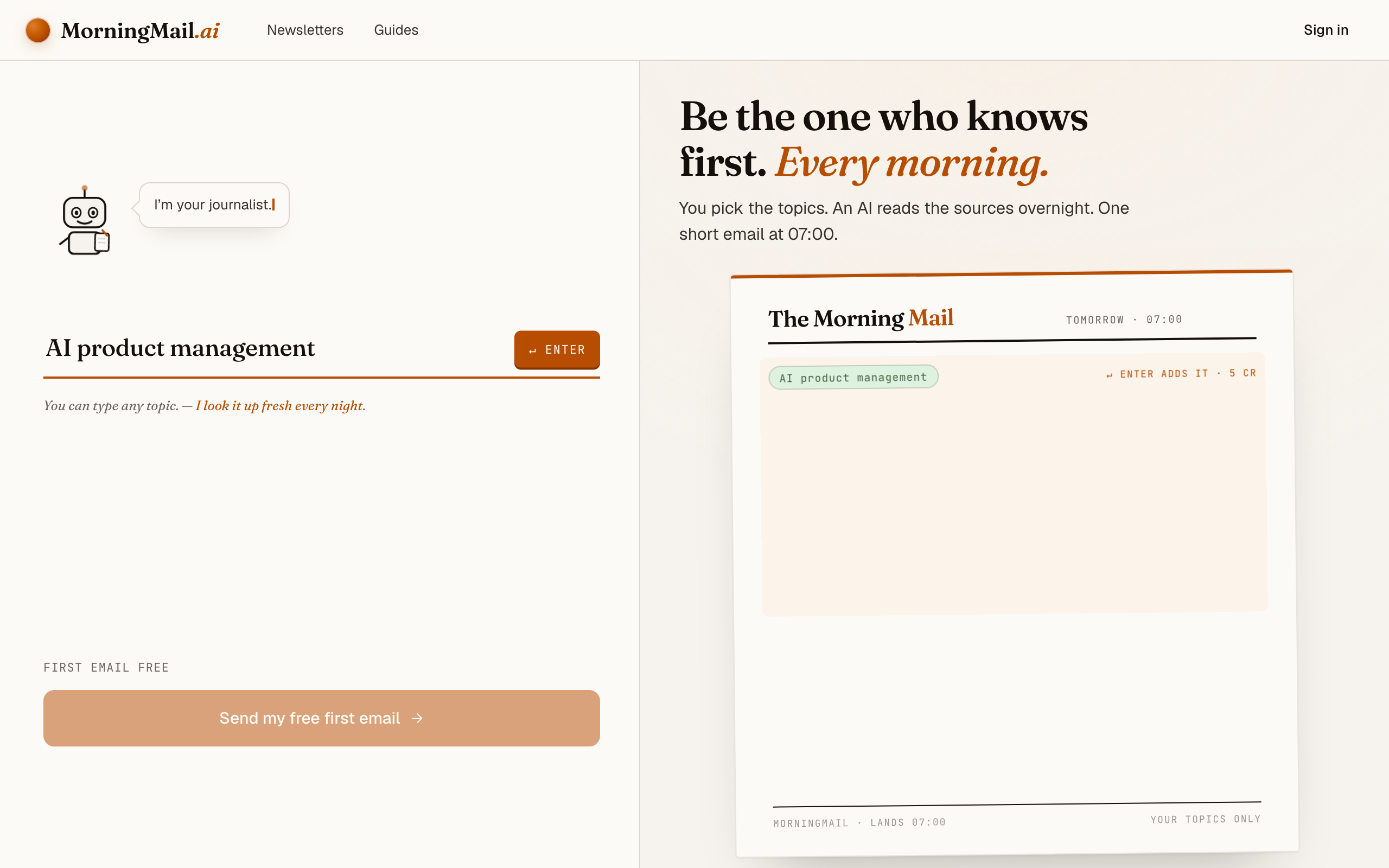
Type AI product management into that one input. There is nothing to pick and no form to fill — as you type, a draft section forms on the paper beside you, carrying your topic in a tinted badge and the quiet prompt "↵ Enter adds it", and the ↵ Enter key at the end of the input turns orange.
Step 3 Press Enter (or that orange key) — and read what the agent was told
Here's the whole trick: morningmail.ai opens on the writing surface itself — one big input, a paper taking shape next to it, no account yet. Type AI product management and press Enter. The section lands already written: a tinted badge for the beat it inferred, a suggested headline, and an Assignment — real prose telling the agent what to go looking for tomorrow morning. No blank box, no hidden magic.
And that Assignment is yours. Click it and rewrite it in your own words, or tap one of the five tweaks underneath — "+ name sources", "+ skip the hype" — and it appends the line for you. What I'd add is one sentence about your product: "My product is a B2B SaaS on AWS; flag anything that changes cost, latency, or EU compliance." That one sentence does more than any filter ever will.
The exact prompt your section starts withReleases, benchmarks and the sharpest take on AI product management from the past 24 hours — compressed to what a builder actually needs.
Step 4 Send your free first email
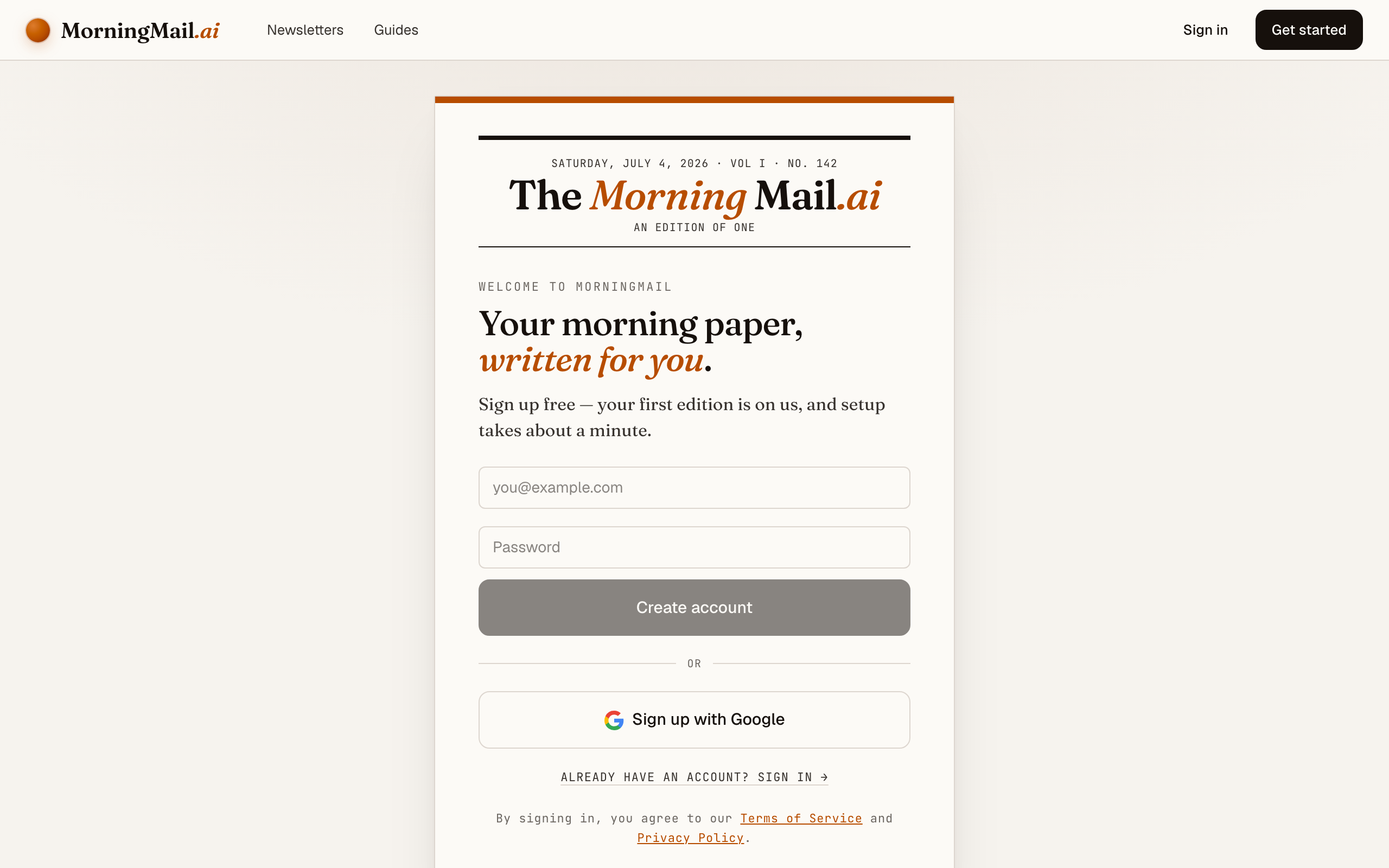
Happy with the paper? Hit “Send my free first email”. The sign-up appears right there — the paper never leaves the screen — and asks the only thing it still needs: where to send it. Email and password, or Google. No card, and the first email is free.
Step 5 Watch it being written
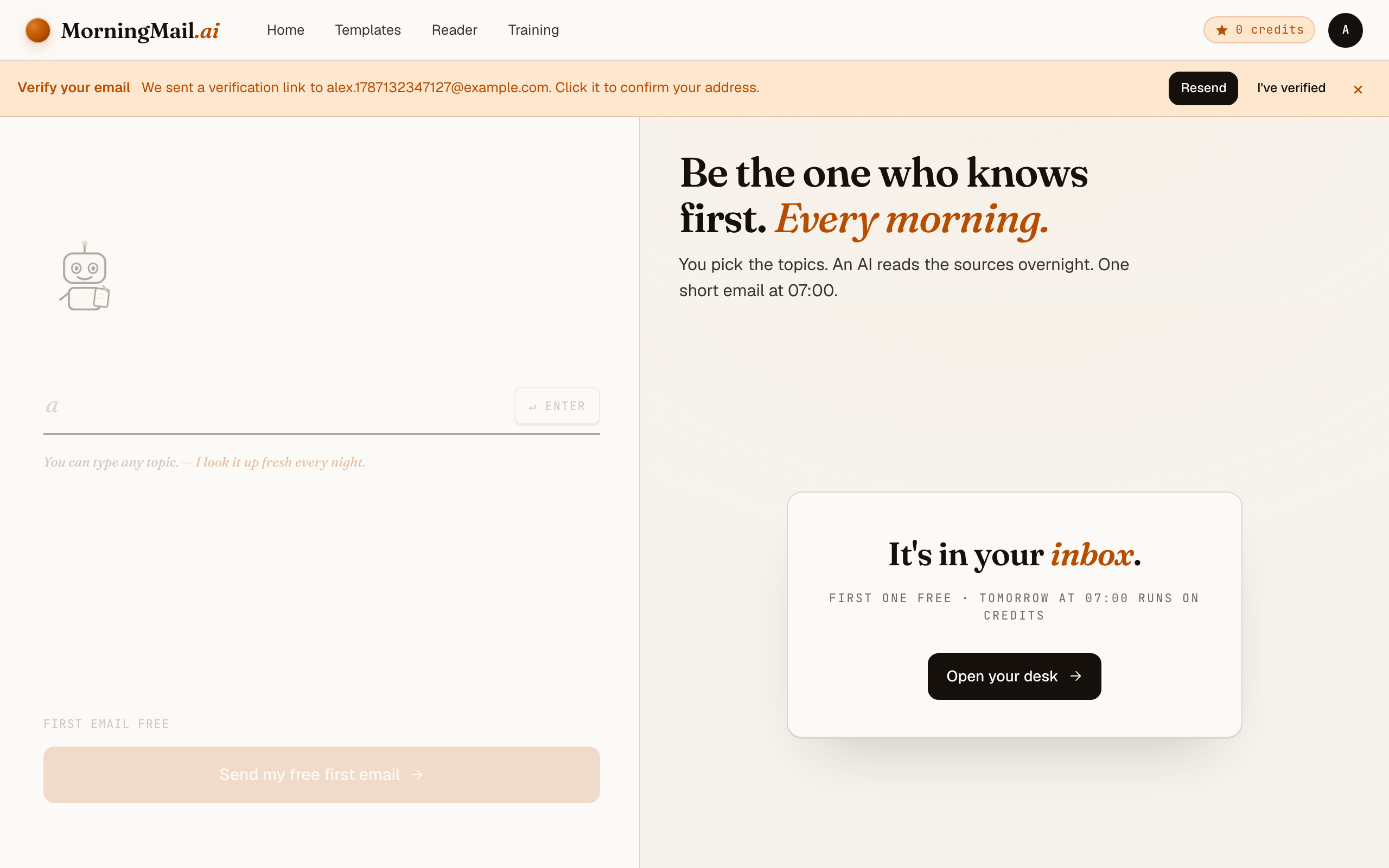
Now the desk goes to work in front of you: working out what to look for, searching the web, reading the best sources, writing your section, composing a subject line, handing it to the post. A minute or two later: "It's in your inbox."
Step 6 Afterwards: the time, the days, the readers
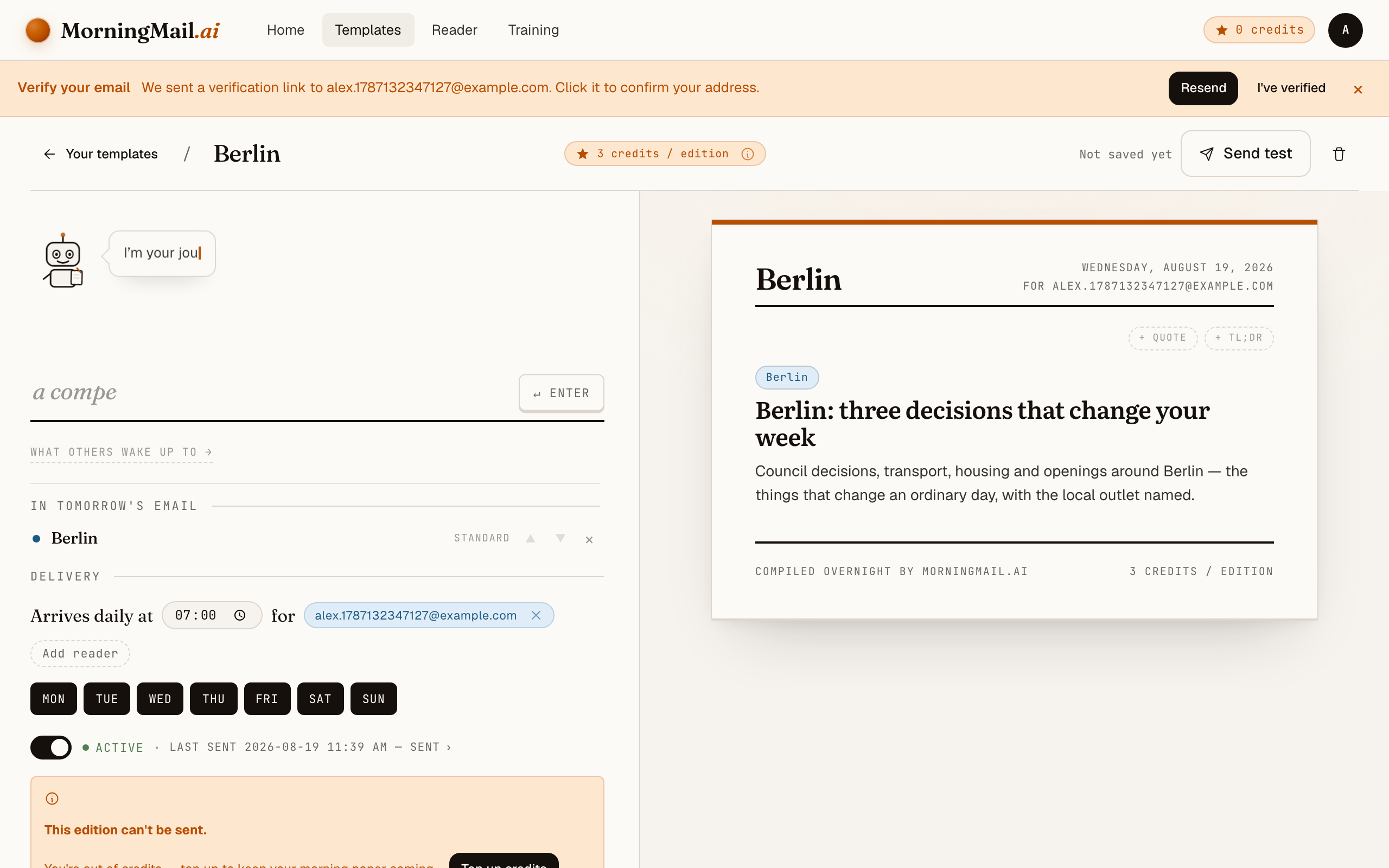
Everything else lives in the builder, once you have a paper to tune. Set the delivery time (07:00 by default) and which weekdays it runs, add readers — up to 100 — and add more topics the same way you added the first: by typing. Nothing here needs deciding on day one.
Get more out of your brief
- Write the prompt like a job description, not a search query
- "AI news" gets you a wire feed. "Report what changed for teams building on LLM APIs: releases, pricing, deprecations" gets you an analyst. Talk to the agent the way you'd brief a smart intern — it follows instructions.
- Add your product context once, benefit every day
- One sentence of standing context — your domain, your stack, your market — changes everything downstream. "We ship a customer-support product on Anthropic models for EU mid-market clients" quietly filters every edition through what actually affects you. Write it once and forget it's there.
- Ask for implications, not just headlines
- Add "one sentence per story on why it matters for product decisions" to your prompt. That second sentence is the whole difference between a feed and a brief — it's the thinking you'd otherwise do on the train.
- Stack sections into one email
- Your template isn't limited to one topic. I add a calendar section for today's meetings and a TLDR section that boils everything down to three bullets at the top. One email, whole morning covered.
- Tune length and tone to your reading time
- Every section has its own length and tone settings. Brief runs long? Switch the section to short and bullets. Forwarding it to your team? Neutral reads better than chatty.
Good sources to anchor your brief on
The agent searches the open web every morning and cites where it read things. These are the sources I'd point it at in your prompt:
- OpenAI, Anthropic & Google DeepMind blogs — The primary sources for model releases, API changes, and pricing. Announcements land here before the press coverage — your brief links straight to them.
- Hacker News — The fastest signal for what practitioners actually adopt. A good brief cites it for traction, not for hot takes.
- Lenny's Newsletter — The reference for how product teams integrate AI features in practice. It's weekly — your daily brief fills the gap between issues.
- The Verge — AI section — Reliable consumer-side coverage: product launches, policy fights, and the user-facing angle your roadmap eventually meets.
- arXiv (cs.AI / cs.CL) — Where capability jumps show up first, months before productisation. Include it if your product sits close to the model layer.
- EU Digital Strategy news — The official source for AI Act guidance and enforcement — the regulatory input that turns into compliance tickets on your board.
Frequently asked questions
- What does it cost?
- Your first edition is completely free — no credit card required. After that, sending runs on credits: each section in your email costs a few credits depending on the AI model tier it uses, and credits never expire. A short daily brief comes to a handful of credits each morning.
- How is this different from Google Alerts?
- Honestly — it's a different category. Google Alerts forwards links whose text matches your keywords; the reading, deduplicating, and judging stays with you. A MorningMail brief is written: the agent searches fresh sources every morning, discards the noise, and composes a short email with the implications spelled out and the primary sources linked. You read a memo, not a link list.
- Can I get the brief in German or another language?
- Yes — write your prompt in the language you want the brief in, and the agent answers in that language. The interface itself is available in English and German.
- What if the brief misses a story I cared about?
- It happens — and the fix takes ten seconds. The prompt is yours: name the gap explicitly, like "always include API pricing changes, even minor ones." The agent re-reads its instructions every morning, so the correction applies from the next edition.
- Can I share the brief with my team?
- Yes — templates support multiple recipients, so your whole product trio can get the same morning email. And if your section turns out great, you can share it to the public community gallery so others can subscribe to it.
Your inbox, your editor
Build your own AI-written brief in two minutes. The first edition is on me — no credit card required.
Build your brief — freeI am always happy to answer questions and I'm open to feedback. Feel free to reach out at any time: marius@morningmail.ai